Posts

Modeling & 3d printing tryout & technical progress - Week 10 & Week 11
Image
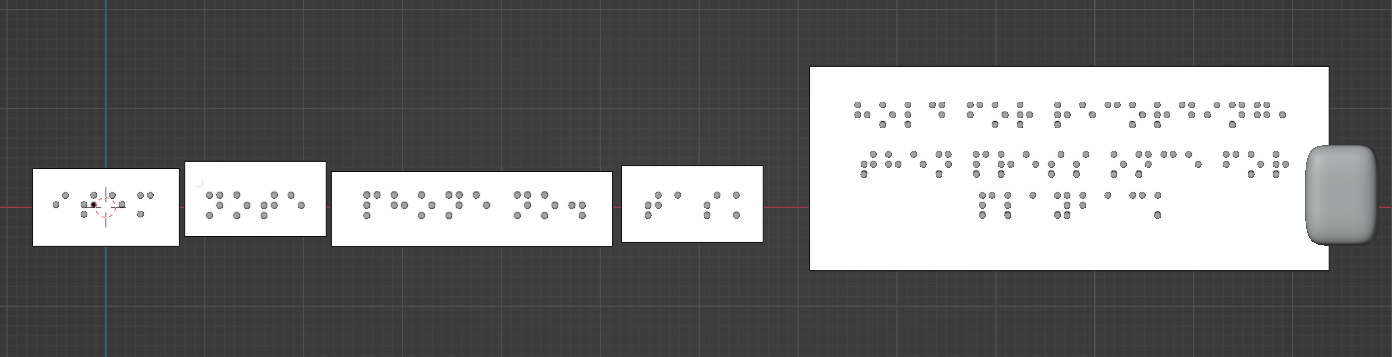
Locked Down the display title on the device During the study week, I plan to spend time locking down the display title on the device and model out the appearance of the device. Below is a showcase of the Braille font display on the wearable device. Item  Item Task Task Note Note Phone No. Phone no. Hold for recording, Hold for recording, Then press once for playback Modeling device I then import the text as an image reference and model it out in Blender. The title arrangement was according to the previous interviewer's response which allocate the most important title in the first place and sequence arranging.             The surface of the device is flat to make the user easy to read the braille. A USB hole for them to power up the device. extrude and attach the front and back of the device holder for holding the string string for the device in the alpha test Modify the device To keep the project smaller scale, I removed the meeting...

New Mechanics Tryout - Week 8 & Week 9

Image
Assembling Connection Pins In Week 8 & Week 9, my online packages for Arduino mechanics are finally here. I start by assembling the pin connections. The assembling pins parts all refer to online resources I found. I only attach one push button in the current state to ensure it can work after moving on to multiple buttons.

3d printing Tryout & Comfirmation Mechanics - Week 7

Image
Project Development 3d printing In Week 7, I used 3d printing to print the cover. The purpose of my doing this is to make myself familiar with 3d printing. Because in previous semesters, I only have little knowledge of 3d printing.  Besides, to start tryouts and failed multiple times in the beginning. Below is my tryout process. In modeling stage In the preview 3d printing stage 3d printing After the 3D printing trial, I realise the wearable device's depth is limited. Furthermore, I made the model too thin so that it would be simple to break out. Here, I discovered how to make the model more substantial and in-depth.

Hand Up Do good Project Proposal - Week 7

Image
  Project Category I choose the sixth category for the assignments which is optimizing: making daily activities more efficient. Project Background Our human brains can store a maximum amount of memory. Therefore, we rely on taking notes down in case we forgot. This task seems so simple for normal people to do, we normally send messages in our own chat on our phone or take notes in a digital notepad. Similarly, most blind people have the habit of taking notes too. They use audio recording as a result to keep track of these tasks and plans. However, they experience inconvenience from the phone recording because they will record the voice instructions if they use their phone at the same time. In addition, the audio files are arranged in an absolute mess without labels. Besides, there are more steps for them to click the recording they want. Because they need to go to work every day, they always bring their essentials —white canes, work bags, wallets, and keys— along with them. No...

Refinement on Choosed Design Plan & Technical Tryout -Week 6

Image
In week 5, I had some discussions with another lecturer on my design plan. I showed him both of my design plans.  The first design discussions  He believed that all blind people can use phone recordings, with the exception of elderly blind people who are typically uninitiated by electronics. He mentioned to me that to choose this, I need to change my target audience to elderly blind people. The second design discussions  He said the proposal would be more convenient for visually impaired people executing on an application of a phone. The approach was welcomed by all visually impaired people.  Both approaches were fine to proceed with, depending on which target audience I prefer.  

Design Planning -Week 5

Image
  Design Planning  After secondary research and primary research, I have two design plans at this stage both of which address the same problem but in different directions. It is a special device that provides find things easily without taking time to find out. 

Find Interviewer and Get their responses - Week 4

Image
Contact company service for the Blind Community After the project proposal was approved, I immediately create a survey form for the blind community. The survey form was created in English and Bahasa Melayu, in case I met someone who is more fluent in Malay.   To find the blind community, I try to email Malaysia Association for the Blind (MAB) for asking their permission to interview the blind community.  However, the company hasn't reply my message. So, I try to contact the service number provided on Facebook. Fortunately, the company picked up my phone. They said they had received my email and need take time for them to reply to my message. They promise me they will arrange an online meeting for me with the blind community.